

Our last Manual-J post focused on envelope loads and how important it is to properly account for them in your HVAC design. Now we will turn to design loads, or the almost worst case temperatures that our building must handle to keep the building occupants comfortable. This is the battle between the indoor and outdoor temperatures – the ΔT.
Unfortunately, the design temperature inputs in Manual-J are often manipulated to try to avoid comfort callbacks. As a result the system will be oversized in an attempt to avoid anyone ever getting too hot or too cold. HVAC designers who do this are unintentionally making it harder for the system to handle moisture and the part load temperatures.
In addition to potential energy, moisture, and comfort issues for clients, improperly completing load calcs and improper sizing can result in liability issues for HVAC contractors. Manual-J load calculations are required by code after all, and failing to do them properly can put more than your reputation at stake. Lets take a closer look at design temperatures used in Manual-J to ensure that you can find and use the right numbers.
Manual-J Design Temperatures
Manual-J uses ASHRAE design temperatures to determine this design load or temperature difference between the indoor and outdoor environments. This is the way that Manual-J, unlike a rule of thumb accounts for the location of the building. ASHRAE has determined that we need to design the HVAC system to handle a temperatures that will occur 99% of the time – 1% cooling dry bulb and 99% heating dry bulb.
Using historic weather data, 1% cooling dry bulb is the temperature exceeded only 1% of the hours in the year. For heating, 99% heating dry bulb means that the temperature is above this point 99% of the time. Again, in both cases we are handling the almost worst case.
Outdoor design temperatures can be found in Table 1-A in Manual-J. As an example lets look at the design temperatures we would use for a Manual-J in Baltimore, Maryland. On the chart below you can see that for the Baltimore airport, cooling 1% dry bulb is 91°. The heating 99% dry bulb is 15°. This is exactly what you would want to plug into your Manual-J software.
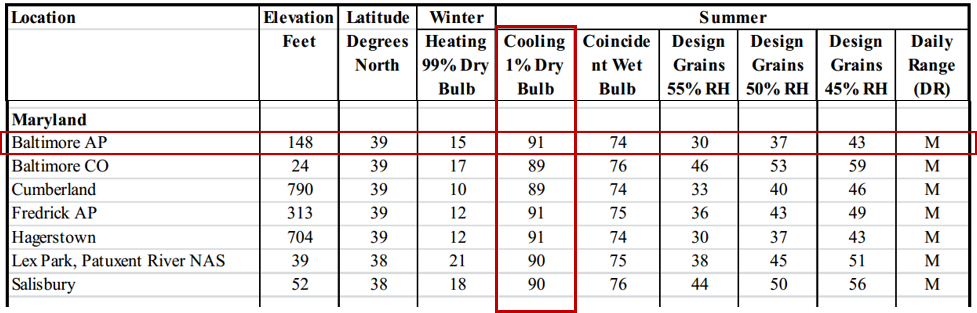
Indoor design temperature are pretty straightforward. Design for 70° F for heating and 75° F for cooling. The difference between these indoor constants and the variable outdoor temperatures determines the ΔT or the design load on the building.
Design temperatures are where we see people game the system. Instead of using 91° they pick a number subjectively. They know it gets hot and decide that they want to use 95° for there design temperature which results in an oversized system designed to meet extreme load conditions. This means that when using fixed equipment, 99% of the time you are using more energy than necessary to cool the house. Not only that but the system will most likely short cycle remove less moisture from the air.
To learn more about the impact that the design load has on the Manual-J load calculation and how to accurately account for them in the software, check out our online Manual-J training here. No time to do them yourself. Hire a professional.
The Online Manual-J Training Advantage
Most Manual-J training courses available today will provide you with either a building science primer and review of the book, or conversely, will provide you with just an overview of a software package. Most of these coming in one or two day live events with little time for comprehending the material. Our Manual-J Online Training is different because we give you the total package in a format that allows for in-depth comprehension. We provide an in-depth building science primer, tips and tricks from years of experience with completing load calculations, a step-by-step guide to using the software, and the opportunity to perfect the Manual-J through practice exercises. To register for our online Manual-J training, click on your software preference here: Wrightsoft Rightsuite Universal or Elite RHVAC